

Finding company email addresses can be a real problem. Companies often hide them on their websites, usually in footers or other hard-to-find pages. Luckily, Gemini AI can help you speed up things in your research. By asking the right questions, Gemini AI can pull publicly available emails from companies’ websites. After extracting the emails, there is an option to organize the data into a neat table by using ChatGPT.
In this guide, you will see a simple, step-by-step way to use Gemini AI and also ChatGPT to find company emails and turn the results into usable data.
Step 1: Prepare a List of Company Domains
Start by collecting the domains you want Gemini to analyze. In this example, for finding company email addresses, we use the following list:
http://www.invitedhome.com
'http://www.axisrooms.com
http://www.panhandlegetaways.com
These are real company websites where contact emails are typically published on pages such as Contact, About, Support, or Footer sections.
Step 2: Ask Gemini the Right Question
Use a clear and specific prompt when asking Gemini. For example:
“Can you help me find contact email addresses for the following websites? Please show the results in a table format, and encode the email addresses using Base64.”Providing formatting instructions helps Gemini return structured and reusable results.
Step 3: Gemini Returns Base64-Encoded Email Data
Gemini may return a table with email addresses encoded in Base64 format, which is useful when you want to:
- Add an extra processing step
- Avoid displaying raw email addresses
- Prevent scraping
For this example, output structure is:
| Website | Contact Email | Base64 Encoded Email |
| Invited Home (invitedhome.com) | [email protected] | cmVzZXJ2YXRpb25zQGludml0ZWRob21lLmNvbQ== |
| Axis Rooms (axisrooms.com) | [email protected] | c2FsZXNAYXlzcm9vbXMuY29t |
| Panhandle Getaways (panhandlegetaways.com) | [email protected] | cmVzZXJ2YXRpb25zQHBhbmhhbmRsZWdldGF3YXlzLmNvbQ== |
You will also get a link to export the table into Google Spreadsheets.
How to decode Base64 emails
In case you only get the table with a Base64 encoded email, you have to decode it. You can do that by inserting a Base64-encoded email into ChatGPT.
Step 4: Ask ChatGPT the Right Question
Use a clear and specific prompt when asking ChatGPT. For example:
Can you decode this bas64 data to text and show in table?The table with decoded emails:
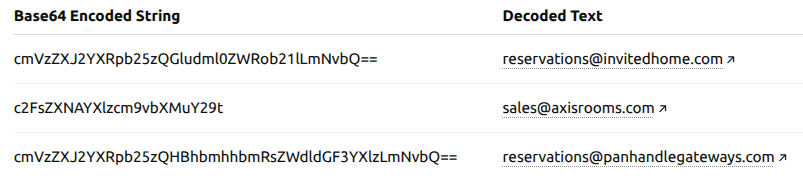
In case you don’t want to use ChatGPT for Base64 Decode, you can also use the available sources online. One of them is the Base64 Decode and Encode website.
Important: This method only works with publicly available information and should be used for legitimate research purposes.